A Time Timer alternative that tells you when to start.
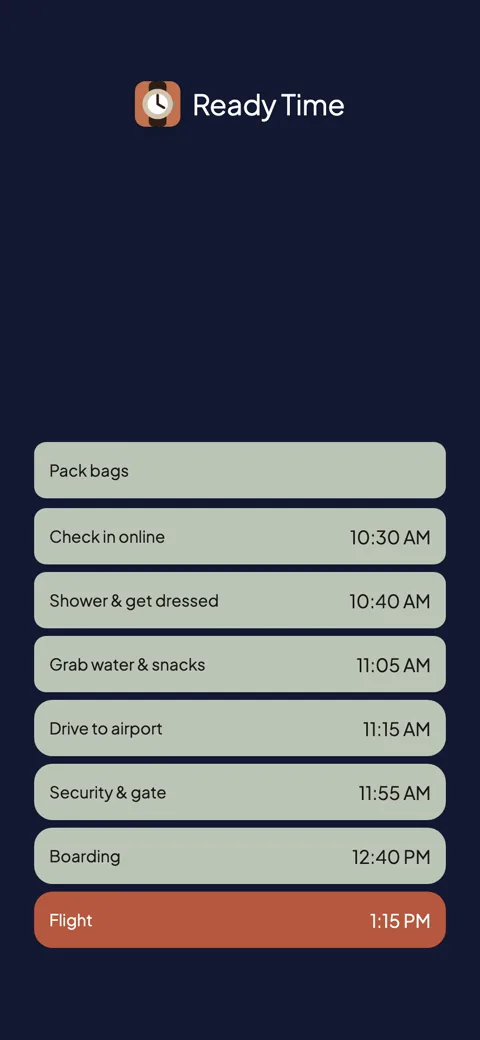
A timer shows one block of time going by. Ready Time works back from your deadline and tells you when each step has to start, with an alert at each one.
Ready Time
You know what you need to do. Ready Time helps you know when to start.

Time Timer is the original visual timer. The shrinking red disk has helped classrooms, therapists, and kids actually see time passing. The app brings the same idea to your phone, watch, and Mac. For making one block of time visible, it is hard to beat.
A timer counts down from now. It can show you 40 minutes draining away. It cannot tell you that being ready by 8:15 means the shower has to start at 7:35. You still do that math yourself before you set it. A lot of people who look for a Time Timer alternative still like the disk. They just want help figuring out when to start each step.
Ready Time works the other way around. Tell it when you need to be ready, list the steps with how long each one takes, and it works backward to a start time for every step. Then it alerts you at each one, right when it is time to begin.
On a rushed morning, that timing matters. A timer shows you that the shower already ran long. Ready Time tells you when to get in while you can still do something about it.
| Ready Time | Time Timer | |
|---|---|---|
| The core idea | Backward from your deadline to every start time | Counts one block down from now |
| Tells you when to start | Yes, an alert per step | No, you do the math first |
| Multiple steps | Every plan is a sequence | Sequences run forward from play (Premium) |
| Watching time pass | Countdown to your next start | The shrinking disk, still the clearest |
| Shared plans | Yes | Syncs your own devices (Premium) |
| Pricing model | Free; one-time unlock. No subscription | Free tier; Premium by subscription or one-time |
| Account | No account | None for the free timer; Premium needs one |
| Sync | iCloud, through your own Apple ID | Across mobile and desktop (Premium) |
| Platforms | iPhone & iPad | iPhone, iPad, Mac, Apple Watch, Android |
Both apps exist because clocks are easy to ignore. Ready Time has been in the App Store since 2018, and the core is free: deadlines, steps, backward math, and alerts.
Plenty of people. If you are timing homework, transitions, or work sprints one block at a time, the disk is a great fit, and the physical timers are classroom staples for a reason. If you need Android, a Mac app, or a timer on your wrist, Time Timer has you covered and Ready Time does not.
Consider switching when the block itself works fine, but the steps leading up to the deadline are where things go wrong.
Want an app that walks you through the steps once you have started? See how Ready Time compares to Routinery, or browse all comparisons.
“I always think there is more time in the day than there actually is. This app breaks down tasks and makes sure I allow for and schedule out my tasks and projects for the day.”App Store review
Ready Time
You know what you need to do. Ready Time helps you know when to start.

More comparisons
More on being ready on time