A Focus Bear alternative for being ready on time.
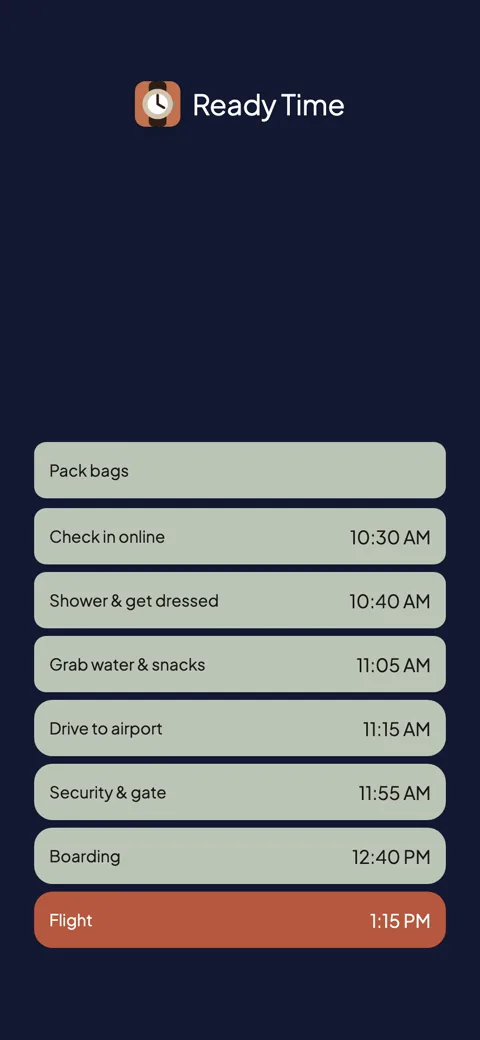
Set the time you need to be ready and the steps. Ready Time works back to a start time for each one and alerts you at every one.

Ready Time
You know what you need to do. Ready Time helps you know when to start.

Focus Bear walks you through morning and evening habits one at a time, blocks distracting websites and apps across your devices while you work, and nudges you into breaks. For people who lose hours once a laptop opens, the blocking alone is a real reason to use it.
The routines run forward. You launch one, or it starts at a scheduled time, and Focus Bear walks you through the steps from there. It does not take a deadline (out the door by 8:15) and work out when the routine has to begin. If the morning starts late, the walkthrough still runs, and you still arrive late.
Ready Time sticks to a smaller job. Tell it when you need to be ready, list the steps with how long each one takes, and it works backward to a start time for every step. Then it alerts you at each one. No blocking, no breaks, no habit streaks: the backward math and a nudge at every start time.
| Ready Time | Focus Bear | |
|---|---|---|
| The core idea | Backward from your deadline to every start time | Guided routines plus distraction blocking |
| Tells you when to start | Yes, computed from the deadline | Runs when launched or at a scheduled time |
| “Ready by 8:15” | Enter 8:15; it finds every start | Do the math, then schedule the routine |
| During the routine | An alert and countdown per step | Walks you through each habit in order |
| Distraction blocking | None | Websites and apps, across your devices |
| Pricing model | Free; one-time unlock. No subscription | Free tier; Pro by subscription |
| Account | No account | Required |
| Sync | iCloud, through your own Apple ID | Through your Focus Bear account |
| Platforms | iPhone & iPad | iPhone, Mac, Windows |
Focus Bear covers more of the day than Ready Time does: focus sessions on your Mac and PC, blocking, breaks, and habit tracking, with a free tier for the basics. Ready Time has been in the App Store since 2018 on one question: given your deadline, when does each step have to start?
Stay if distraction is the main problem. Ready Time has nothing like the cross-device blocking, and if opening the laptop means losing an hour, Focus Bear is solving that. Stay too if you want one system for habits, focus, and breaks together.
Switch if your routines run fine once started and the trouble is starting them late. That is the start-time math Ready Time handles for you.
Llama Life takes a gentler, list-shaped approach to timed work. See that comparison, or browse all comparisons.
“I tend to be overly optimistic when estimating how long things take, and this app has really helped me get it right.”App Store review
Ready Time
You know what you need to do. Ready Time helps you know when to start.

More comparisons
More on being ready on time