A Structured alternative that plans backward.
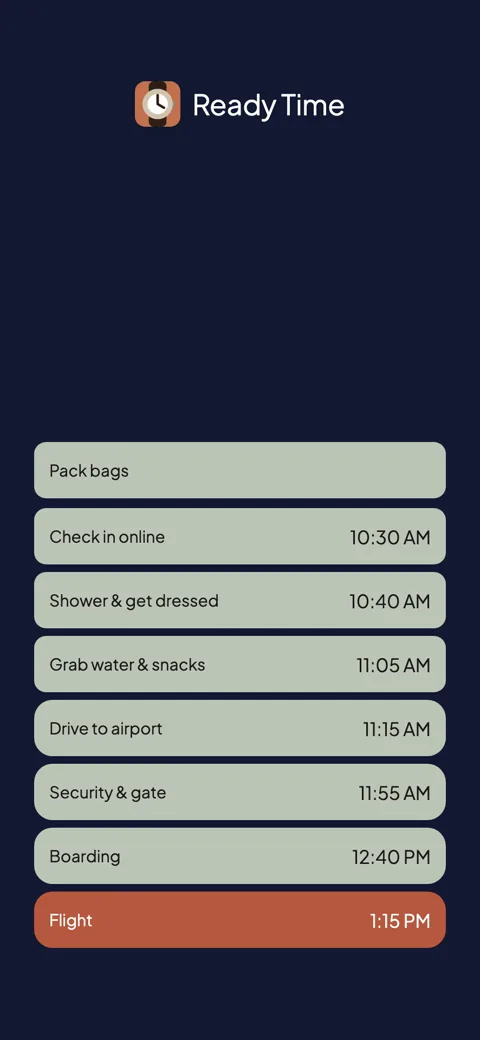
Give Ready Time the deadline and the steps. It does the start-time math and alerts you at each one, and the plan reflows when a step changes.

Ready Time
You know what you need to do. Ready Time helps you know when to start.

Structured is the category leader for timeboxing, and for good reason: an Editors' Choice day planner, a clean vertical timeline, calendar import, and versions for basically every screen. If you want your day from 7 to 10 laid out as blocks, this is the app people mean.
Every block's start time is yours to pick, and yours to fix. When a meeting runs long, you drag blocks around to rebuild the afternoon. Moments with real deadlines (be ready by 8:15, leave for the flight by 2:40) sit on the timeline like any other block. The start-time math still happens in your head.
Ready Time is built around that math. Set the deadline, list the steps and their durations, and it works out every start time backward from the end. Then it alerts you at each one. Stretch a step and the whole plan reflows, so you do not have to rebuild by hand.
| Ready Time | Structured | |
|---|---|---|
| The core idea | Backward from your deadline to every start time | Timebox your day forward on a timeline |
| Tells you when to start | Yes, computed from the deadline | Blocks alert at times you set |
| When plans slip | Change a step; the rest recompute | Drag to rebuild; Replan moves past tasks (paid, Apple only) |
| Repeating plans | Yes (one-time unlock) | Recurring tasks (paid) |
| Shared plans | Yes | Shared calendar only; no user-to-user sharing yet |
| Pricing model | Free; one-time unlock. No subscription | Free basics; Pro subscription or lifetime |
| Account | No account | None to start; Cloud account optional |
| Sync | iCloud, through your own Apple ID | Structured Cloud, including web |
| Platforms | iPhone & iPad | iPhone, iPad, Mac, Apple Watch, Android, web |
Structured covers more ground than Ready Time in almost every direction: platforms, calendar integration, and a full planning surface. Ready Time has stuck with one idea since 2018: deadlines, steps, and the backward math between them.
Stay if you want the whole day planned (work blocks, calendar events, habits) and a timeline is how you think. Structured is a strong choice for that, and the lifetime option means you can skip the subscription if you prefer.
Switch if you mainly open a day planner to answer one question: when do I need to start?
Tiimo plays in the same all-day space with a softer touch. See that comparison, or browse all comparisons.
“I always think there is more time in the day than there actually is. This app breaks down tasks and makes sure I allow for and schedule out my tasks and projects for the day.”App Store review
Ready Time
You know what you need to do. Ready Time helps you know when to start.

More comparisons
More on being ready on time