A Tiimo alternative for being ready on time.
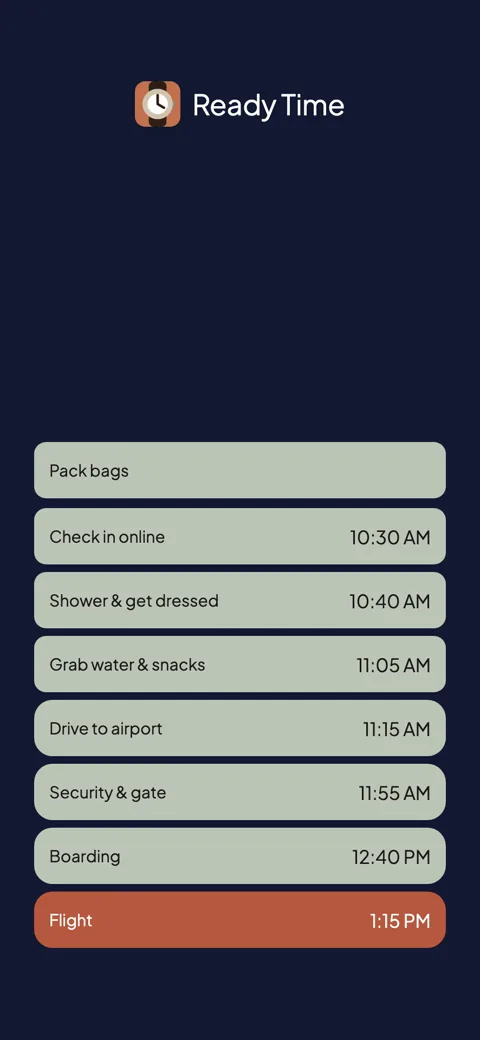
Set the time you need to be out the door and the steps before it. Ready Time works out when each one starts and alerts you at every start time.
Ready Time
You know what you need to do. Ready Time helps you know when to start.

Tiimo earns the praise it gets. Apple named it iPhone App of the Year in 2025, and the visual timeline (your whole day as gentle, color-coded blocks) is a wonderful way to plan for people who lose track of time.
A whole-day timeline takes ongoing care. It works when you plan each day, place each block, and keep the timeline true as the day shifts. If most of your day runs fine and only the deadline moments go sideways (out the door by 8:15, at the appointment by 2:00), you may be maintaining more planner than you need. The timeline also runs forward: blocks alert at the times you placed them, so placing them is still up to you.
Ready Time focuses on the moments with a clock on them. Set the time you need to be ready, list the steps, and it works backward to when each one has to start. Then it alerts you at every start time. There is no timeline to tend. A morning plan gets built once and can repeat.
| Ready Time | Tiimo | |
|---|---|---|
| The core idea | Backward from your deadline to every start time | Your whole day as a forward timeline |
| Tells you when to start | Yes, computed from the deadline | Alerts at the times you placed |
| Daily upkeep | Build once, set it to repeat | Best when you lay out each day |
| AI features | None | AI co-planner splits tasks (paid) |
| Shared plans | Yes | Extra profiles under one subscription |
| Pricing model | Free; one-time unlock. No subscription | Subscription only |
| Account | No account | Email account |
| Sync | iCloud, through your own Apple ID | Cloud sync, including web |
| Platforms | iPhone & iPad | iPhone, iPad, Android, Mac, Apple Watch, web |
If those platform and feature columns matter to you, Tiimo wins them honestly. Ready Time sticks to one idea: the backward math from a deadline, with an alert at every start time.
Stay if you want your entire day made visible (the timeline, the icons, the gentle structure) and you will actually keep it up. That is the job Tiimo was built for, and it does it well across every screen you own.
Switch if the planner keeps lapsing because it asks for more upkeep than you need. A deadline, some steps, and being told when to start can be enough on their own.
Timeboxing your whole day is Structured's territory too. See that comparison, or browse all comparisons.
“I tend to be overly optimistic when estimating how long things take, and this app has really helped me get it right.”App Store review
Ready Time
You know what you need to do. Ready Time helps you know when to start.

More comparisons
More on being ready on time